Why Choose Fibre Optic Cables for Your Business?
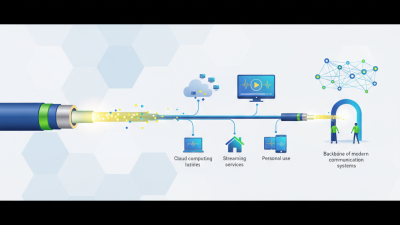
A business network is easy to overlook until a video call freezes or a large file takes minutes to transfer. As staff, cloud services, and connected devices place greater demands on infrastructure, the cables behind the network matter. Fibre optic technology carries data as pulses of light through thin strands of glass or plastic. It can support high bandwidth over long distances, with less signal loss than many copper links. That difference can matter in a warehouse, a multi-storey office, or a campus connecting several buildings.
On a busy workday, faster, more consistent connections can make shared systems feel more responsive. Fibre may also be less susceptible to electromagnetic interference, which is useful near certain machinery. A technician can assess the route, equipment, and expected traffic before recommending a design. Small details count: connector type, bend radius, and protection from crushing can affect performance. No magic fix.
Still, fibre optic cabling is not automatically the best choice for every business. Installation may require specialist skills, compatible switches, and a larger upfront budget than a simple copper upgrade. Existing conduits can also complicate the work. The right decision depends on distance, capacity needs, future plans, and total lifecycle cost—not speed claims alone. A careful comparison helps businesses avoid paying for capacity they will not use, or choosing a network that soon feels cramped. In this guide, we’ll explore where fibre excels, what to check before installation, and how to judge whether it fits your operation. Even a good choice deserves a second look.

Fiber-Optic Basics: Glass Cores Transmit Light at About 200,000 km/s
A fibre-optic cable carries data as light through a narrow glass core. In silica, light travels at about 200,000 km/s, compared with 299,792 km/s in a vacuum. The precise speed varies with the glass’s refractive index and the cable design. At the core boundary, light is guided along the fibre by total internal reflection. A pulse can cross a city quickly. Still, the speed figure can mislead: distance, routing, and equipment also affect delay.
For standard single-mode fibre, ITU-T Recommendation G.652 specifies attenuation limits of about 0.4 dB/km at 1310 nm and 0.3 dB/km at 1550 nm. Over 10 km, 0.3 dB/km adds roughly 3 dB of loss, before connectors and splices. That is about half the optical power. Real links add losses. A poorly made splice can matter more than the impressive speed figure suggests, so installers measure each link rather than relying on estimates alone. The numbers are useful, but they do not tell the whole story. A business should check route length, connection points, and test results when planning a fibre connection.
Network Reach: IEEE 10GBASE-SR Supports Up to 400 m over OM4
For business networks, 10GBASE-SR can provide a practical 10 Gb/s link across buildings or large floors. IEEE 802.3-2022 specifies a maximum reach of 400 m over OM4 multimode fibre. The Ethernet Alliance’s Ethernet roadmap also lists 400 m as the OM4 reach for 10GBASE-SR. These figures make OM4 useful when a copper run is too long or a single fibre path needs to connect distant network rooms. The optics operate at 850 nm. Still, 400 m is a limit, not a design target.
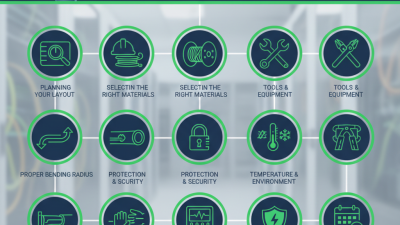
Tips: Measure the full channel, including patch leads. Allow margin for connectors, bends, and future changes. A neat floor plan can hide a surprisingly long route.
Before ordering optics, confirm that both ends support 10GBASE-SR and that the installed fibre is OM4, not merely OM3. Check connector cleanliness, too; a speck of dust can disrupt a link that looks perfect on paper. For an important path, test the completed channel and keep the results with the site records. Fibre can reduce signal-loss concerns over distance, but it does not remove installation risk. That distinction is easy to overlook.
Bandwidth Growth: 100G Ethernet Fiber Carries Data at 100 Gb/s
A 100G Ethernet fiber link is designed to carry data at 100 Gb/s, supporting demanding traffic across a business network. That capacity helps when teams move large files, run virtual machines, or back up data during busy hours. A design studio, for example, can transfer high-resolution video while staff continue using shared storage. The difference is practical. No magic, though.
Fiber is not affected by electromagnetic interference, which can matter in equipment rooms crowded with power cables. However, 100 Gb/s describes the link rate, not guaranteed application speed. Protocol overhead, server limits, and network congestion reduce usable throughput. Distance and performance also depend on fiber type, optical modules, connector quality, and installation. Small details count.
Before upgrading, measure peak traffic and check that switches, network cards, and storage can support the faster link. Confirm the required reach, too; a connection between nearby racks may need different components than one spanning a building. One point is easy to miss: 100G equipment can cost more and may exceed current needs. It is worth comparing the cost with actual traffic growth, rather than choosing the highest number by default.
Signal Integrity: Optical Links Resist EMI and Carry No Electrical Current
Why Choose Fibre Optic Cables for Your Business?
Fibre optic cables carry data as pulses of light, not electrical signals. This matters near motors, welding equipment, and long power runs, where electromagnetic interference can disrupt copper links. The fibre itself carries no electrical current, so it does not conduct surges between connected buildings. That can help protect sensitive network equipment and maintain stable connections.
Small detail, real impact. In a busy workshop, a link that stays clear beside a running motor can prevent dropped readings or delayed updates. Still, fibre is not magic; poor installation or dirty connectors can weaken a signal.
The benefit is especially useful for links between buildings, control rooms, or equipment areas with electrical noise. Optical connections can also span longer distances without the same signal loss seen in many copper runs. But the full system still includes powered optical equipment at each end. That part needs careful placement and maintenance.
A fibre link also needs suitable transceivers, connectors, and testing, so it may not be the simplest choice for every short office connection.
Tips: Keep connector ends clean and capped until installation. Respect the cable’s minimum bend radius; tight turns can damage fibres. Ask an installer to test the completed link and record its signal levels. Check the route for crushing risks, not just electrical interference. Small oversights happen, and cable plans sometimes miss real-world obstacles. Walk the route before work begins.
Deployment Planning: 10GBASE-LR Reaches 10 km vs. 100 m for 10GBASE-T
When planning a 10-gigabit link, distance can change the entire design. 10GBASE-LR is specified for links up to 10 km over compatible single-mode fiber. 10GBASE-T typically reaches up to 100 m over suitable Category 6A copper cabling. That is a major gap. A server room may need only a short copper run, while a campus connection may cross several buildings.
Map the route before choosing equipment. Measure the full cable path, including vertical risers and detours around power or mechanical systems. A 90 m horizontal copper run can leave little room for patch cords within the 100 m channel limit. Fiber may simplify a longer route, but confirm the required optical interface, fiber type, connector, and link budget at both ends. The stated 10 km range is not a promise for every installation.
Think about upkeep, too. Copper ports can be convenient for nearby devices, while fiber supports longer distances and can reduce concerns about electromagnetic interference. But fiber handling takes care: keep connectors clean, protect cable bends, and label strands clearly. Small details matter. I still find route estimates easy to underestimate, especially when plans omit service loops or later rerouting. Validate the design against equipment specifications and actual site conditions before ordering.